Releasing and consuming open source: Hatching your own OSS trust & safety project
Written by
Anne Bertucio de Hollembeak, COO, ROOST
Published
ROOST is on a mission to make online safety tools available for every organization who needs them. We do this by building and distributing open source solutions, which is a fairly new concept in the trust and safety space. At last year’s TrustCon, the majority of my conversations were introductions to open source. Encouragingly, the growth in understanding and enthusiasm for open source is palpable; this year, instead of having questions about the concept, safety practitioners had questions about how to get into open source: “My company wants to release open source tools; what does that look like?” and “How do I run open source tools like Coop and Osprey for our team?”
Releasing open source
There are many valid reasons and ways to release tools as open source. At its most fundamental, “releasing as open source” means to put a specific license on the software/tools/document you’re sharing. That’s it. There are countless variants in open source licenses, but what unites them is permission to freely inspect, use, modify, and redistribute.
A tool provided at no-cost but without one of these licenses is not “open source.” The tool can be used for free, but users don’t necessarily have permission to modify or share the tool, or their modifications, with others. Conversely, source code provided with an open source license but nothing else (documentation, intentional community) is technically still “open source.”
Why a company might do this varies. Open source itself is not a strategy, but it’s a strategy in pursuit of an end goal. That end goal might be:
Transparency and auditability. Revealing how things work to earn the trust of users or other interested parties. For trust and safety, that could be aggregated content data, or the formula a platform uses to count strikes.
Demo or sample. To provide something customers can modify for their environment, such as example policies for a detection model or queries for an investigation tool.
Proof of concept. Sharing in a way others can tinker with and continue to advance; for example, zero-knowledge proof libraries for identity validation.
Defacto norm. To create a new common way of doing something in the field so speciality products can interoperate; for example, content labeling or content review and routing infrastructure.
Benefit for everyone. To freely share something that isn’t a product differentiator but can benefit everyone, plus demonstrate technical leadership and commitment to the field. For example, investigation infrastructure or harms detection model.
The strategy dictates what support the open source tools then needs to be successful. In general:
Tools released for transparency don’t need maintenance or ongoing support. The purpose is to enable inspection.
Demos and samples typically need a minimum level of maintenance and user feedback integration to remain relevant over time.
For proofs of concept to advance, they need stewardship and project management. This doesn’t necessarily have to come from the creator, but people usually look to the creator to kickstart collaboration, and without it they typically don’t move past “interesting ideas."
Creating a defacto norm needs strong stewardship, project management, and community engagement. Making a norm requires consensus building and working across parties. A single person or company’s idea, without any changes, rarely becomes the norm.
Tools that can benefit everyone need maintenance, user feedback, and community engagement to go from a “free idea” to “reliable solution.”
Every organization has different capacity and expertise for how to steward an open source project. That’s where organizations like ROOST come in.
While the license on ROOST projects enables inspection (and that’s great for auditability and transparency), our model is closer to the last two strategies (with a few proof of concepts thrown in to keep things interesting!).
We’re focused on building and sustaining solutions that bring the best of safety tech to everyone who needs it, from independent newsrooms to growing platforms. That kind of reliable, widely available project needs community building, project management, and some days sprinting through the bug queue. It’s a lot of work, but it’s work that pays dividends when a small team is able to fight coordinated fraud, or a startup is able to do child safety reporting for the first time.
If you’re interested in open sourcing safety technology, whether as a donation to ROOST or independently, we’re happy to be a resource on the different pathways in open source (hello@roost.tools). More openly licensed safety technology means more tools in the defender’s toolbox.
Consuming open source software (like Coop and Osprey)
The other topic of my conversations was the specifics of what it means to consume open source software, or quite literally, “How do I actually get ROOST tools?”
In broad strokes the options are:
Self-hosted
Vendor-provided
Self-hosted
At github.com/roostorg are code repositories for the Coop and Osprey projects. In these respective repositories are the full source code for these projects. There are a few ways to download the code, but once you do, you have your own copy of Coop or Osprey. This is yours to keep indefinitely and change how you want.
You can either run it on your laptop (for proofs of concept and experimenting), or run it in your organization’s compute environment. This is what we call “self-hosted.” Self-hosted allows organizations to fully control any data associated with Coop or Osprey, and data never has to leave the organization’s boundaries. Depending on an organization’s existing compute and storage infrastructure, it may be more cost effective to self-host (e.g. if you’re already running a carwash, you may as well wash your own car there). Other organizations prioritize the cost control that comes with self-hosting.
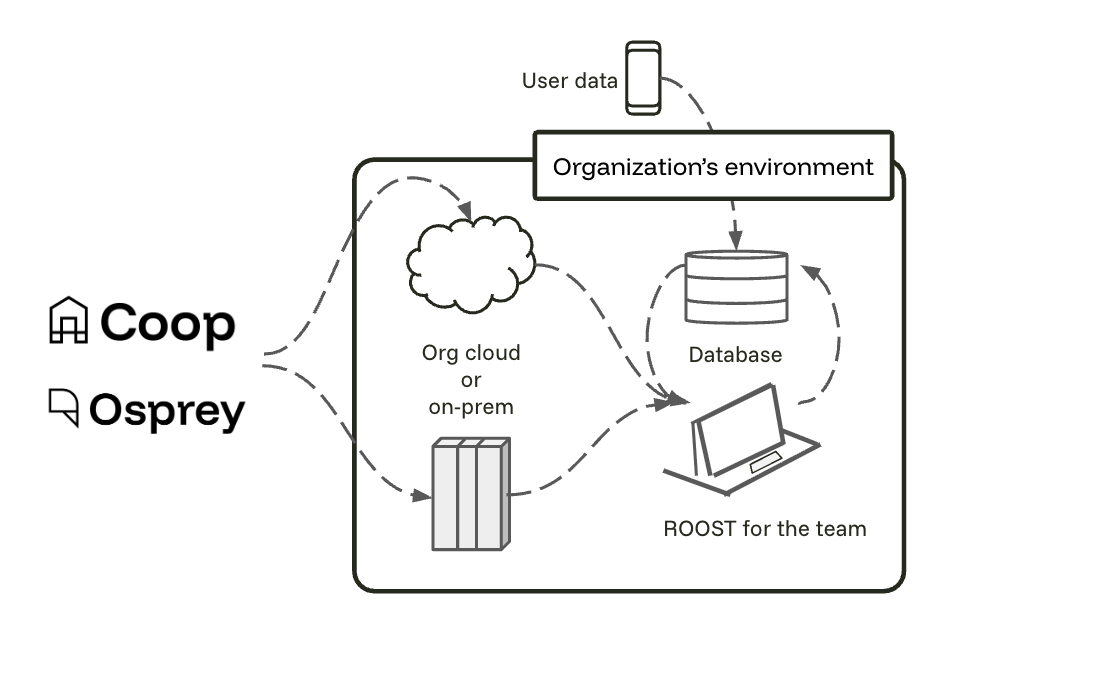
While this option comes with the most control, it also comes with the most responsibilities. This includes updating the software when there’s a new release, and ensuring services that support Coop or Osprey (such as data streams) are working correctly. For some teams those tasks are negligible adds; for others it’s a brand new area.
Tip: Your organization may have existing directions for how to download and set up open source software like ROOST. These directions usually live with an Open Source Programs Office or a security team.
Vendor-hosted
Vendor-hosted, also called an open source managed service, looks a lot like the software-as-a-service you may be familiar with. A vendor has downloaded and hosted the Coop or Osprey code, you just need to bring your data and log into the hosted service. In general, responsibilities like updating the software and ensuring data stability live with the vendor. While data likely leaves an organization’s environment, vendors will have data privacy and handling practices in place to address risks.
Vendors may also modify the open source project to have distinct features their team comes up with, or have integrated in other offerings they have, such as detection models.
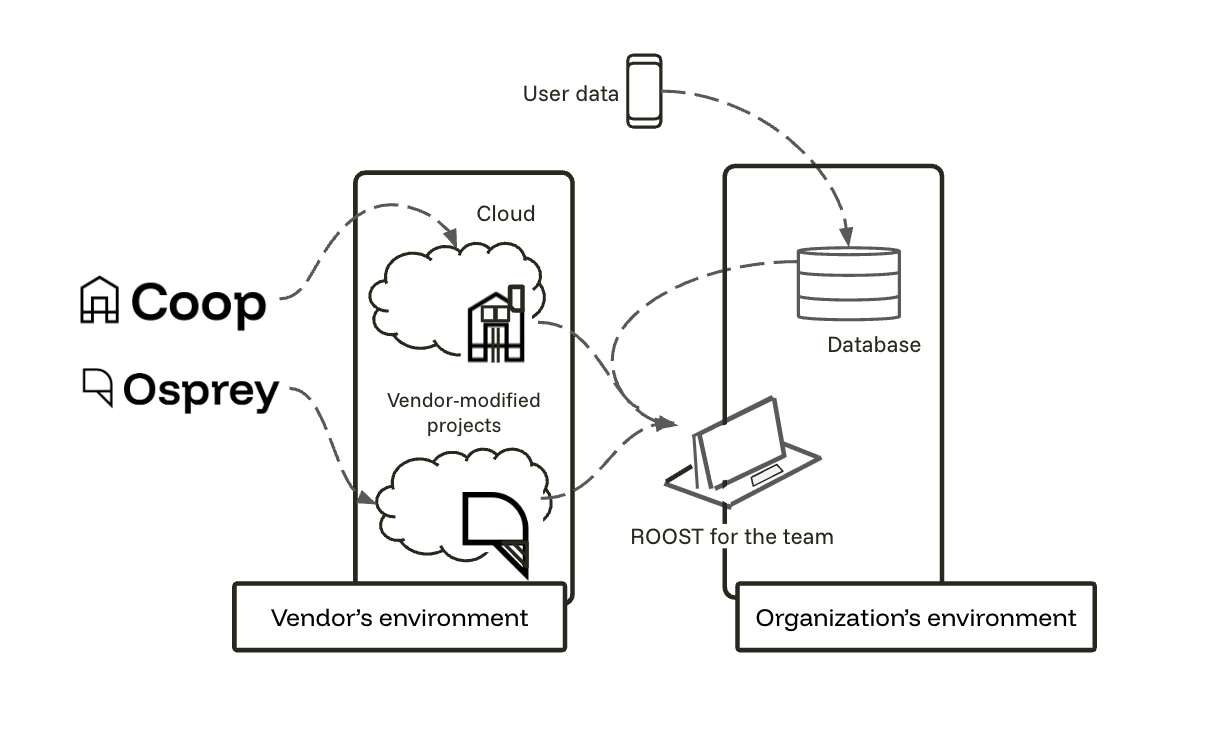
An alternative flavor of “vendor-hosted” is to hire a vendor to setup and maintain Coop or Osprey within your environment. This route combines the control of self-hosted with the offloaded tasks of vendor-hosted.
Because the core of the service is open source, organizations going the vendor-provided route get the benefits of managed services, but are also not “locked in” to a single – or any – vendor. Organizations can later decide to switch to the self-hosted path, or switch to a different vendor that also offers a managed service of that open source project. This reduces switching costs and gives organizations more control.
Musubi Coop is an example of a vendor-hosted solution. Musubi uses Coop as the core for their hosted moderation console, with Musubi’s AI features and models as integrated components.
The decision to host open source software yourself or use a vendor-provided solution usually involves a tradeoff among data control, in-house operational capacity, cost, and speed to launch. Teams with established infrastructure and strict data-boundary requirements may prefer self-hosting; teams that want to get started quickly—or do not want to operate the supporting systems—may prefer a managed service.
Interested in offering commercial services of ROOST tools? The license enables commercialization without permission, but we’d love to chat! Email hello@roost.tools.